
Stop missing buying opportunities - introducing the Capital Rebalancer
You set up your strategies. Triggers are calibrated. Capital is allocated. Everything is running.
Then one morning, your daily report says: “3 buy signals were skipped - insufficient capital.”
Your Bitcoin strategy wanted to buy the dip, but it had €4 left. Meanwhile, your Ethereum strategy has been sitting on €200 for two weeks - the market just hasn’t moved enough to trigger a buy.
The money was there. It was just in the wrong place.
The problem: capital gets stuck
When you run multiple strategies, capital naturally drifts. A strategy that buys heavily during a crash depletes its capital. A strategy on a quiet asset accumulates idle EUR. Over time, some strategies are starving while others are sitting on cash they don’t need.
Until now, spotting this required checking each strategy individually - opening the detail page, looking at free capital, comparing it to the buy amount, mentally calculating how many buys are left. Across 10+ strategies, that’s tedious.
The fix: see it all at once
The new Rebalance tab in the Lab shows your entire capital allocation in one view:
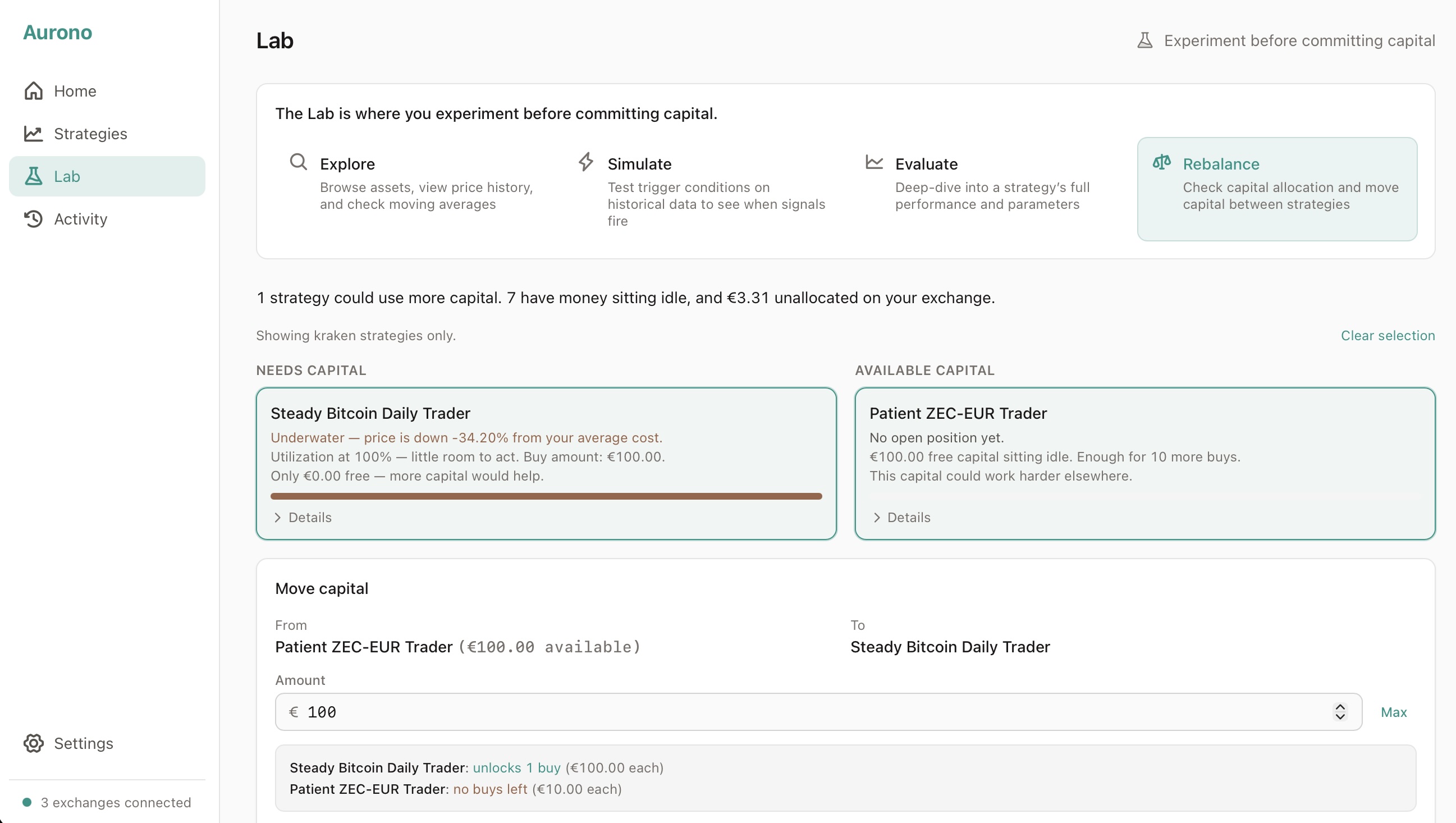
Left column: strategies that need capital. Sorted by urgency - strategies with zero buys remaining and recent missed opportunities appear first. Each card tells the story: “Underwater - price is 8% below your average cost. Missed 3 buying opportunities this week. Needs €10 per buy.”
Right column: capital that’s available. Strategies with idle cash, sorted by how many buys they could spare. Plus unallocated EUR on your exchange that isn’t assigned to any strategy. Each card explains: “€200 free, hasn’t needed to buy in 2 weeks. Enough for 8 more buys.”
Move capital in two clicks
Select a strategy from each side. Aurono shows you the impact in real time as you enter an amount:
- Cautious Bitcoin Daily: unlocks 3 buys (€25 each)
- Patient Ethereum Trader: 8 → 5 buys remaining (€25 each)
Hit transfer. Confirm. Done. The capital moves instantly and the view refreshes - the strategy that was stuck now has room to act.
Here’s the whole flow, start to finish:
Same exchange only
One important constraint: capital can only move between strategies on the same exchange. When you select a Bitvavo strategy that needs capital, the right column automatically filters to show only Bitvavo sources. You can’t move EUR from Kraken to Bitvavo through Aurono - that requires a manual withdrawal and deposit on the exchanges themselves.
When to use it
Check the Rebalance tab when:
- Your daily report mentions missed buy signals
- You notice a strategy hasn’t traded in a while despite market movement
- After a crash, when buy-heavy strategies may have depleted their capital
- When adding fresh EUR to your exchange and deciding where to allocate it
You don’t need to rebalance constantly. But when capital is misallocated, the Rebalance tab makes it obvious - and fixing it takes seconds.
The bigger picture
The Rebalance tab is part of a broader direction: helping you learn from your own decisions. Aurono doesn’t tell you what to do - it shows you what’s happening so you can decide.
Your strategies are your rules. Capital allocation is your call. Aurono just makes sure you have the information to make that call quickly and confidently.
The Capital Rebalancer is available now in Lab → Rebalance. It works with all three supported exchanges: Bitvavo, Kraken, and Coinbase.
Want the full reference? The Capital Rebalancer guide walks through every card, the transfer rules, and what happens when you pull from unallocated EUR.