Managing Strategies
The Strategies page shows all your strategies and lets you manage their lifecycle.
Summary Bar
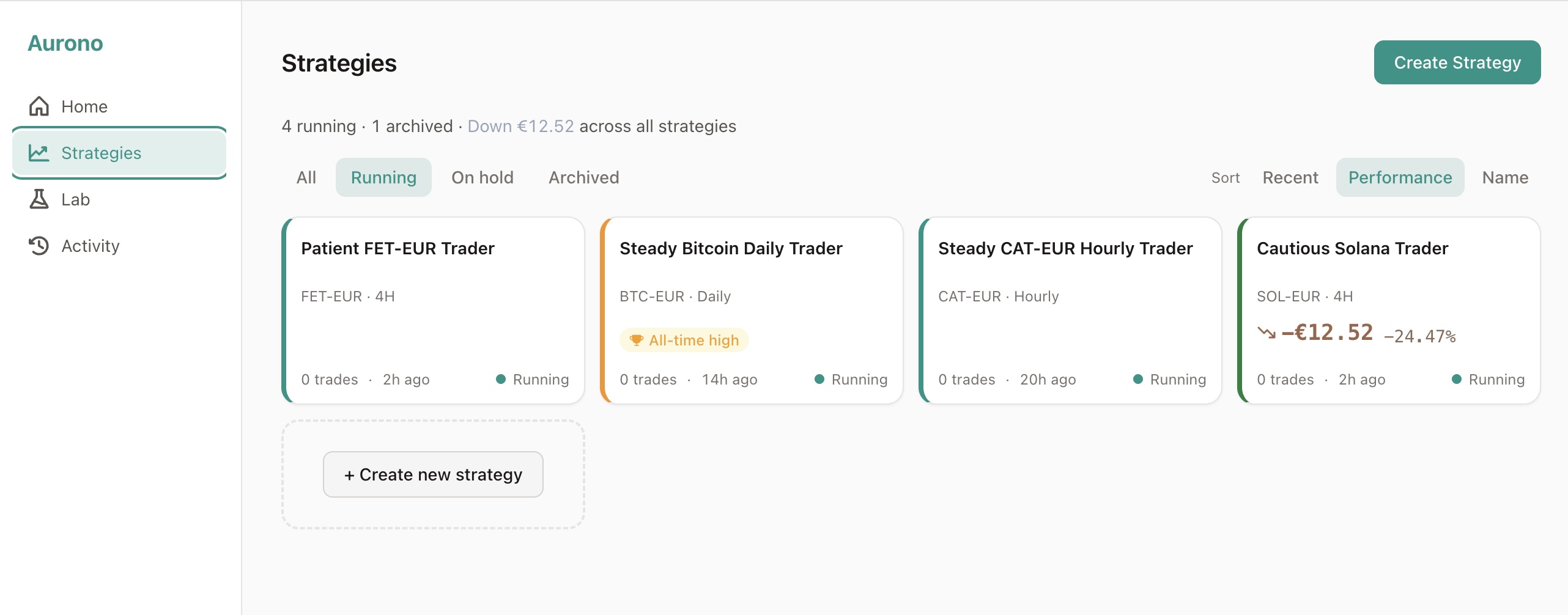
Section titled “Summary Bar”At the top of the page, a summary line shows how many strategies are running, on hold, and archived, plus the total P&L across the currently filtered strategies.
Filtering and Sorting
Section titled “Filtering and Sorting”Status Filters
Section titled “Status Filters”Use the filter tabs to focus on a subset of strategies:
- Running (default) - strategies that are actively evaluating and trading
- On hold - strategies that are paused
- All - every strategy regardless of status
- Archived - strategies that have been retired (shown slightly dimmed)
Sort Options
Section titled “Sort Options”Sort your strategy cards by:
- Performance (default) - best P&L first
- Recent - most recently evaluated first
- Name - alphabetical
Strategy Cards
Section titled “Strategy Cards”Each strategy appears as a compact card showing:
- Name - the strategy name (auto-generated from the asset if you didn’t set one)
- Asset, timeframe, and exchange - e.g. “BTC-EUR - Daily - Bitvavo”
- Status - running or on hold
- Total P&L - realized + unrealized, as amount and percentage
- Round-trip count - how many completed BUY→SELL pairs the strategy has booked
- Last activity - relative time since the last evaluation (e.g. “3 hours ago”)
- Status sentence - a human-readable summary of what the strategy is doing
- Milestone badges - achievements like “First round trip” or “ATH”
A + Create new strategy card always appears at the end of the grid (except in the Archived filter), making it easy to add more strategies.
Creating a Strategy
Section titled “Creating a Strategy”Click Create Strategy (top right) or the card at the end of the grid. You define:
- Exchange and trading pair (e.g. Bitvavo, BTC-EUR)
- Timeframe (e.g. Daily, 4H, Weekly)
- Buy and sell trigger thresholds (sigma-based)
- Order amounts
- Allocated capital
Strategy Lifecycle
Section titled “Strategy Lifecycle”Every strategy goes through a lifecycle:
Create → Active (running) → Pause (on hold) → Activate (running again) → Archive
Pausing and Activating
Section titled “Pausing and Activating”You can pause a running strategy at any time. Pausing stops all evaluation - no decisions are made and no orders are placed. Your capital and positions stay put and still show up in your portfolio totals; they still belong to the strategy.
What changes is that Aurono stops counting a paused strategy when it works out how much EUR your strategies need:
- It doesn’t show up in Lab → Rebalance - not as a strategy that needs capital, and not as a source of spare capital
- It doesn’t count toward the dashboard liquidity warning (“your strategies expect more EUR than is on the exchange”)
- It doesn’t count toward the over-allocation warnings when you create a new strategy or deposit into one
- It won’t fire any trades until you activate it again
If you want to add or take out capital from a paused strategy, do it from the strategy’s detail page - Deposit and Withdraw still work there.
Activate a paused strategy to resume evaluation. As soon as you do, the rebalancer sees it again and any liquidity warnings update.
Archiving
Section titled “Archiving”When you no longer want a strategy, archive it. Archived strategies:
- Stop all evaluation
- Are removed from the Dashboard
- Remain visible under the Archived filter
- Preserve their full history
Archiving is permanent - archived strategies cannot be reactivated.
Strategy Versions
Section titled “Strategy Versions”When you change a strategy’s parameters, Aurono creates a new version. Previous versions are preserved in the strategy’s history, so you can always see what changed and when. This gives you a clear audit trail of every parameter adjustment.
Strategy Detail
Section titled “Strategy Detail”Click any strategy card to open a detail modal with:
- Current parameters and version history
- Capital and inventory breakdown
- P&L metrics (realized and unrealized)
- Trade history
- Evaluation log
- Actions: pause, activate, archive, deposit/withdraw capital
You can navigate between strategies using the left/right arrows or keyboard arrow keys without closing the modal.
If multiple strategies trade the same asset, the detail view shows a contextual ranking (e.g. “Best of 3 BTC strategies”).
Capital Management
Section titled “Capital Management”Each strategy has its own allocated capital. You can:
- Deposit additional capital to a strategy
- Withdraw capital from a strategy (if sufficient free capital is available)
Capital changes are logged as events and reflected immediately in the strategy’s available balance.
To move capital between strategies, use the Rebalance tab in the Lab.
Depositing more than is on the exchange
Section titled “Depositing more than is on the exchange”You can deposit more EUR into a strategy than your exchange currently has free. A yellow warning explains the resulting shortfall, but lets you continue - Aurono treats this as forward planning. The strategy’s free EUR goes up right away, the dashboard banner updates to show the new gap, and the strategy keeps trading as normal. Any buy that fires before you top up the exchange will be rejected by the exchange.
Withdraws are stricter: you can never take out more EUR than the strategy actually has free. That’s a hard limit.
Next Steps
Section titled “Next Steps”- Dashboard - back to the portfolio overview
- Activity - see a timeline of all trades and events
- Lab - Rebalance - move capital between strategies