Strategy Lab
The Strategy Lab is where you explore assets, test strategy ideas, diagnose running strategies, and move cash between them - all without risking capital in surprising ways.
It is accessed from the Lab tab in the Aurono navigation.
Four Modes
Section titled “Four Modes”The Strategy Lab has four tabs, each with a clear job:
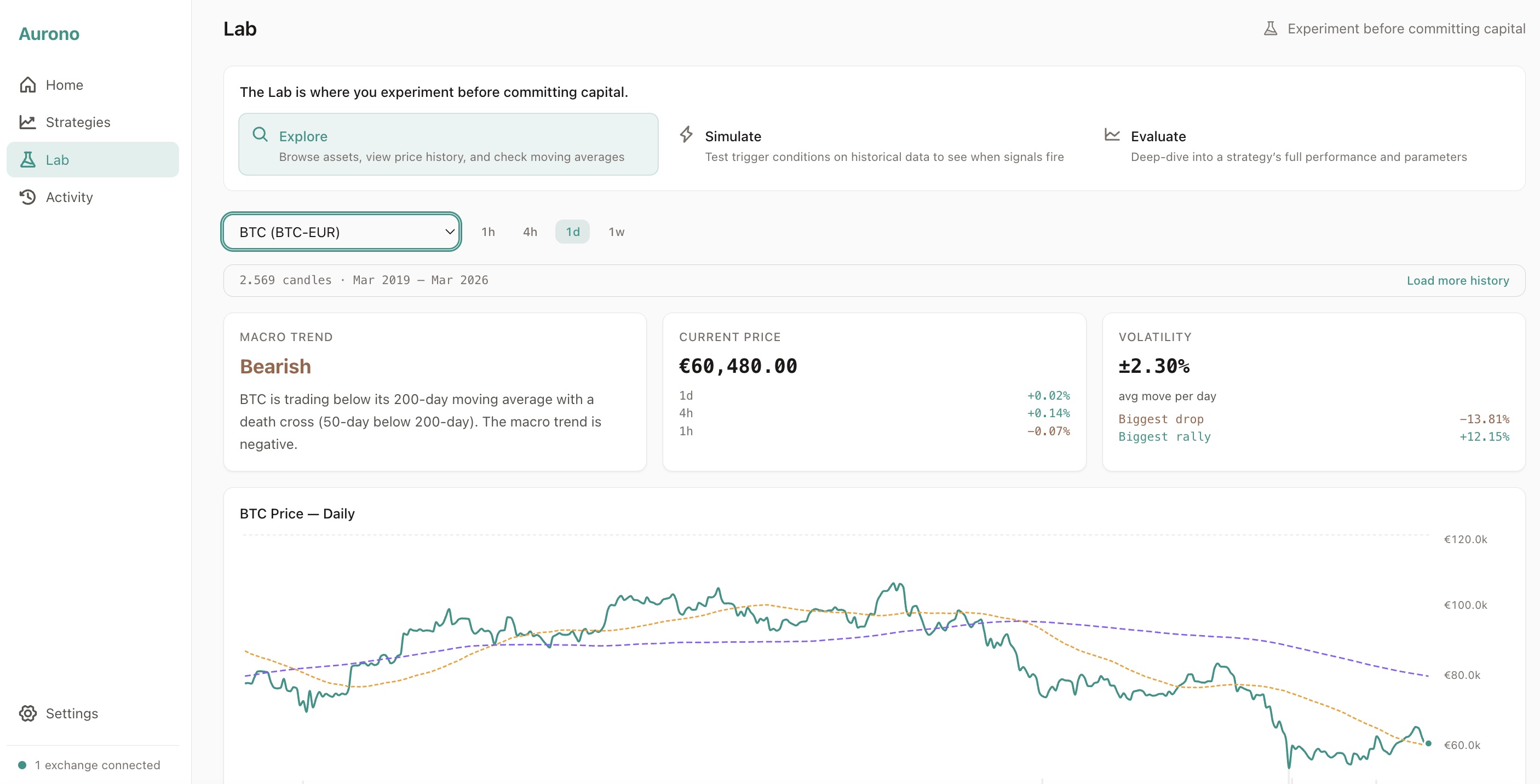
Explore
Section titled “Explore”Browse available trading pairs from your connected exchange. For each asset, you see:
- Price history with moving averages (50-day, 200-day)
- Weekly RSI indicator
- Macro regime classification (Bullish / Bearish / Ranging / Overbought / Oversold)
- Multiple timeframe views (1h / 4h / 1d / 1w)
This gives you a macro picture before committing to a strategy.
Simulate
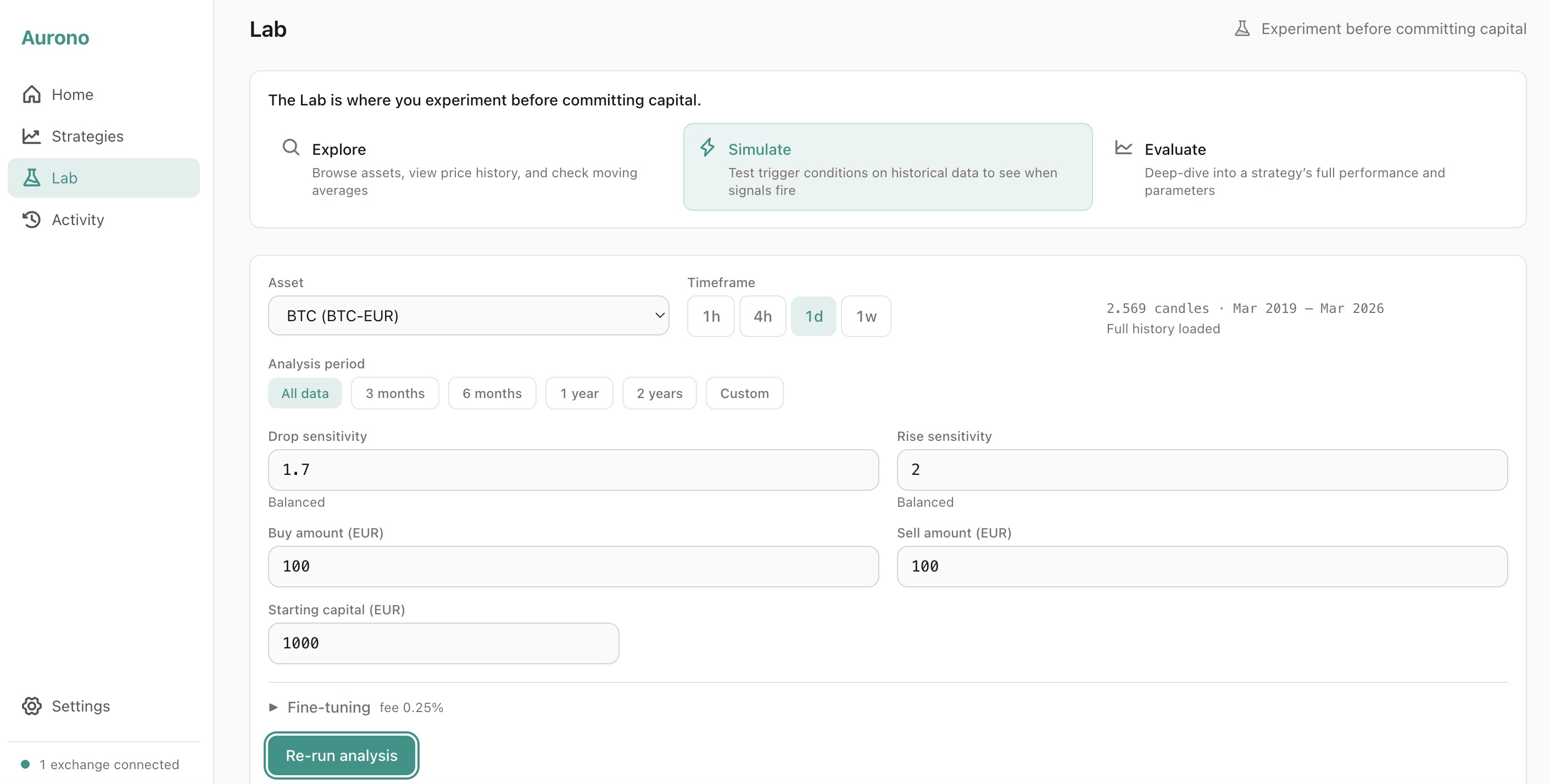
Section titled “Simulate”Test a strategy idea against historical data. You configure:
- Asset and timeframe
- Drop and rise sensitivity (sigma)
- Buy and sell amounts
- Starting capital
- Fee percentage
The simulation runs instantly in your browser and shows how the strategy would have performed.
Evaluate
Section titled “Evaluate”Diagnose a strategy that’s already running. Evaluate takes the same dual-panel chart Simulate uses and fills it with real trade data, so you can see exactly what your strategy has been doing:
- A one-sentence verdict covering days running, total P&L, and comparison vs Buy & Hold + monthly DCA
- Total value, position, realized and unrealized P&L at a glance
- The dual-panel chart with every real trade marked (executed, blocked, or cancelled at the exchange)
- Three insight cards: Benchmark (vs passive alternatives), Calibration (are your triggers firing? why not?), Position (current holdings)
- A danger-zone warning if available cash is nearly exhausted, with a direct link to the Rebalancer
- An audit trail drawer with trades, holdings charts, versions, events, and parameters
Evaluate is the answer to “how is my strategy doing, and does anything need my attention?” It’s silent by default - a well-calibrated strategy shows no warnings. When something needs attention, Evaluate surfaces it as an inline banner with a clear next action.

Rebalance
Section titled “Rebalance”The Rebalance tab shows where your capital is working and where it’s sitting idle.
It answers one question: which strategies need more capital, and where can it come from?
- Left column: Needs capital - strategies that are running low, have missed buying opportunities, or can’t act on triggers
- Right column: Available capital - strategies with idle capital, plus unallocated EUR on your exchange
Select one from each side to transfer capital between them. Aurono shows you the impact in real time - how many buys each strategy gains or loses.
Capital can only move between strategies on the same exchange.
No Capital at Risk
Section titled “No Capital at Risk”Everything in the Strategy Lab is simulation and analysis. No orders are placed, no capital is reserved, and no strategy state is modified.
The only actions that affect real state are:
- “Create strategy” - navigates to the strategy creation form with parameters pre-filled
- “Update version” - applies tested parameters to an existing strategy
Entry Points
Section titled “Entry Points”You can access the Strategy Lab from:
- The Lab tab in the navigation bar
- A strategy’s detail page (“Analyze triggers for BTC-EUR”)
- After creating a strategy (“Test before going live”)
How It Relates to Live Trading
Section titled “How It Relates to Live Trading”The Strategy Lab uses the same logic as Aurono’s live evaluation engine:
- Same percentage change formula
- Same buy and sell conditions
- Same ACB (average cost base) protection
- Same capital reservation rules
What can differ in live trading:
- Exchange latency and fill timing
- Fee rounding differences
- Exact candle alignment at boundaries
If a trade would be skipped in the simulation, it will be skipped live - by design.
Designing Good Strategies
Section titled “Designing Good Strategies”Strong Aurono strategies are capital-aware, patient, and deterministic.
Best practices:
- Prefer fewer, higher-quality triggers over frequent small trades
- Size buy amounts conservatively - leave room for consecutive dips
- Use sell sensitivity to enforce patience - don’t sell on noise
- Validate in the Strategy Lab before deploying live
Common mistakes:
- Too low buy sensitivity with limited capital - triggers constantly but runs out of EUR
- Sell sensitivity too aggressive - sells too early, misses larger moves
- Confusing ignored triggers with bugs - the Lab explains exactly why triggers are skipped
The Strategy Lab exists to prevent these mistakes.
Next Steps
Section titled “Next Steps”- Exploring Assets - understand the macro picture
- Simulating Strategies - test ideas with historical data
- Sigma Explained - how sensitivity controls work
- Evaluating Strategies - diagnose a running strategy
- Capital Rebalancer - fix capital allocation between strategies